 Valusaur
Pokémon Card Value Checker: See What Any Card Is Worth
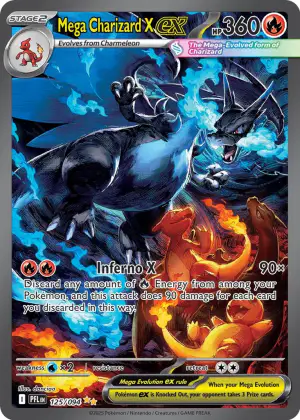
The fastest way to check a Pokémon card's value is to identify the exact card first — set, card number, and finish — then pull a live market price from TCGplayer or Cardmarket rather than a static price guide. Skipping the identification step is the single biggest reason online value checks come back wrong, because a regular holo, a reverse holo, and a secret rare version of the "same" Pokémon can sell for wildly different amounts.
Below is the actual process, the tools people use to do it, and where each one tends to fall short.
Step 1: Identify the exact card before you price it
Every Pokémon card carries two pieces of information in the bottom corner: the card's number and the total card count for that set, printed as a fraction like 4/102. A rarity symbol — a black circle for common, a diamond for uncommon, a star for rare, or a star with "PROMO" for promotional cards — sits nearby, and newer sets add symbols for double rare, ultra rare, illustration rare, and hyper rare tiers (CGC). The set itself is identified by a small logo just above the card's lower border; Base Set is the one exception, since it predates set logos (PriceCharting).
Finish is where manual checks go wrong most often. There are three common versions of a non-rare card:
- Standard — no shine anywhere on the card
- Holo — the holographic effect sits only inside the Pokémon's artwork box
- Reverse holo — the holographic effect covers everything except the artwork box
Reverse holo cards didn't exist until the Legendary Collection expansion, which introduced one reverse holo slot per pack; Scarlet & Violet-era packs bumped that to two (Bulbapedia). Pricing a reverse holo copy off a listing for the regular holo (or vice versa) is a common mistake, and it can be off by a large margin because reverse holos of common and uncommon cards are frequently worth more than the base version. Secret rares add another wrinkle: they carry a collector number higher than the set's stated total, which is what makes them the rarest print in the set rather than an error (CGC). Base Set cards add a further layer — 1st Edition copies carry a stamp near the artwork corner, and "Shadowless" cards (an early, unstamped Base Set print run without drop shadows behind the artwork) are rarer than the standard version that followed (PriceCharting).
This is the step a scanning app is built for. Point Valusaur's camera at a card and it matches the artwork, set symbol, and card number against its database to return the exact printing — holo, reverse holo, or secret rare — instead of you cross-referencing three fields by eye under a lamp.
Step 2: Pull a live price, not a static one
Once you know the exact card, the value comes from what it's actually selling for right now, not what a guide printed last month. TCGplayer's own market-price methodology only counts Near Mint copies with at least ten sales in the trailing period it's measuring, which is why "Market Price" on a listing can move fast when a card gets hot (TCGplayer Seller Blog). In its late-May 2026 price trends report, TCGplayer logged a Giratina V Alternate Full Art (Lost Origin) rising $160.20 to $823.75, and a Pikachu ex 276/217 (Ascended Heroes) rising $142.11 to $1,318.62, over a single 30-day window — both figures pulled from at least ten Near Mint sales each, not asking prices (TCGplayer Seller Blog). That kind of swing is exactly why checking a card's value once and treating it as permanent is a bad habit — a value you looked up three months ago can already be stale.
TCGplayer listings typically show a spread: a low price (cheapest active listing), a mid price (median of active listings), and the market price (recent actual sales, generally the best single number if you need one figure). Cardmarket runs a parallel European marketplace with its own price trends, and values between the two can diverge meaningfully depending on regional demand, so it's worth checking both if you're deciding where to sell. This is the part a scanner-based app handles automatically — Valusaur pulls live TCGplayer and Cardmarket prices for the specific variant you scanned, across seven card regions, so you're not manually toggling between two marketplace tabs and guessing which listing matches your card.
Manual lookup vs. scanning: what actually differs
| Manual lookup | Scan-based check | |
|---|---|---|
| Identifying the exact variant | You compare set symbol, number, and foil pattern by eye | Camera matches artwork + markings automatically |
| Time per card | 1–3 minutes if you know what you're looking for | Seconds |
| Price source | Whatever site you paste the name into | Live TCGplayer + Cardmarket pull |
| Price history | Rarely shown, or a separate lookup | Tracked alongside the scan |
| Best for | A single known card, or verifying a scan result | Sorting through a binder, box, or bulk lot |
Manual lookup isn't wrong — it's the right call when you already know exactly which card and printing you have and just want one number. It gets slow and error-prone the moment you're working through more than a handful of cards, or when a set has multiple finishes of the same card, since every card resets the identification work from scratch.
Where the popular tools differ
- PriceCharting builds its Pokémon price guide by monitoring eBay sales and assigning each one to a specific card and grade, giving you both ungraded and PSA-graded historical price charts by set (PriceCharting). It's strong for graded-card price history but is a lookup tool, not a scanner — you're still identifying the card yourself first.
- TCGplayer is the marketplace itself, so its prices are the most direct read on US secondary-market activity, and its price guide pages break out low/mid/high/market by set. You search or browse to a card manually; there's no built-in camera identification.
- pokedata.io functions as a browseable pricing database covering singles and sealed product across English, Japanese, and Chinese releases, spanning vintage through current sets. It's a reference site rather than a live-pull aggregator or scanner.
- Valusaur scans the physical card, identifies the exact variant, and returns live TCGplayer and Cardmarket prices with history in one pass — useful specifically when you're not 100% sure which printing is in your hand, or when you're going through a stack rather than one card.
FAQ
What's the single most accurate source for a Pokémon card's value? There isn't one universal answer — it depends on where you'd actually sell. TCGplayer market price reflects recent US sales on that marketplace; Cardmarket reflects European sales; PSA/graded price guides like PriceCharting reflect graded-card eBay sales. Check the marketplace that matches your selling channel.
Why did two value checkers give me different prices for the "same" card? Most often it's not the same card — one checker priced the reverse holo and the other priced the regular holo, or one included a secret rare variant and the other didn't. Confirm the exact set number and finish before comparing tools.
Does card condition change the value a lookup tool shows? Yes, substantially. TCGplayer's market price methodology specifically filters to Near Mint sales, so a played or damaged copy of the same card can be worth a fraction of the listed market price.
Is a free scanner app as accurate as pricing it manually on TCGplayer? A scan is only as good as its variant match. Valusaur pulls live TCGplayer and Cardmarket prices for the specific printing it identifies from the scan, which removes the most common manual error — pricing the wrong finish.
How often do Pokémon card prices change? Frequently enough that a months-old value shouldn't be trusted for a sale. TCGplayer's own price trend reports track cards moving by double- and triple-digit dollar amounts within a single 30-day window, driven by set rotations, reprints ending, and buyout activity.
Whichever method you use, the accuracy of any Pokémon card value check comes down to two things: getting the exact variant right, and pulling the price from a live marketplace rather than a stale guide. Scan your cards with Valusaur to identify the exact printing and see live TCGplayer and Cardmarket pricing in one step, or browse how the price history and portfolio tracking work if you're valuing a full collection rather than a single card. For organizing what you've already scanned, the collection tools group everything by set automatically.
Sources
- Understanding Pokémon Rarity Symbols and Card Features — CGC
- How to Tell What Pokemon Card You Have: Set, Number, Edition, & Foil — PriceCharting
- Price Trends: Pokémon Cards Climbing in Price - 05/27/2026 — TCGplayer Seller Blog
- Holofoil — Bulbapedia
- PokeData.io — PokeData
Sources
Wondering what your own cards are worth?
Download on the App Store